|
Problem:
Run My Cycle
Solution:
Understand "My Cycle":
My Cycle is a feature that lets you set a custom wash cycle that can be conveniently activated later on. For example, if you repeatedly use the Normal wash cycle with Cold as the temperature, High for the spin speed, and Normal for the soil level, you could add these settings to My Cycle. In the future, you can quickly apply these settings by simply selecting the My Cycle button.
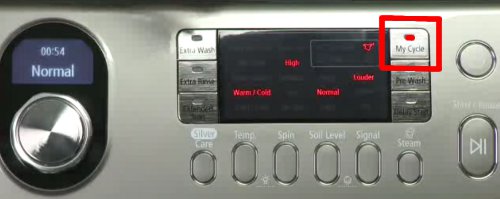
Please follow these steps to set My Cycle:
- Turn on to the washing machine.
- Select your desired settings for the cycle (i.e., Normal, Heavy Duty, Whites, etc.).
- Select any further customized settings (Temperature, Spin Speed, Soil Level).
- Press the My Cycle button.
- To start the cycle, press the Start / Pause button.
- Let the cycle run completely, so the washer can save your preferred settings. The "My Cycle" settings will NOT save until the machine has run the entire cycle.
- The next time you want to use these settings, simply turn the power on and press the My Cycle button.
- To change the My Cycle settings, simply repeat these steps.
NOTE
My Cycle only retains 1 customized setting at a time.
|

