|
Cyber
If you have
your TV connected to an output device
(source) using the Component connections
and the color is not correct, follow
these steps:
- Run
a Self Diagnosis on your TV. Click here for instructions.
- If
the colors are correct in the Self Diagnosis continue to step 3. If the colors are not
correct, your TV requires service.
Click
here
to setup an Online Service
Request.
- Disconnect
the Component cables from your TV,
but leave the green (Y), blue (Pb), and
red (Pr) cables connected to the
output device.
- Verify
that the Component cables are
connected to the output device correctly:
The green cable is attached to the
green (Y) jack, the blue cable attached
to the blue (Pb) jack, and the red
cable attached to the red (Pr)
jack.
- Connect
the green cable to the green
Component jack (Y) on your TV. You should
see
an image that is black and white. If
you do not see a black and white image,
make sure the output device is turned
on.

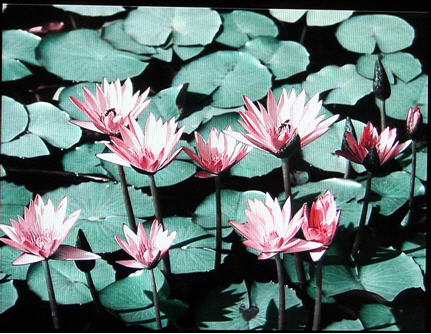
- Connect
the blue cable to the blue Component
jack (Pb) on your TV. The TV should
display an off color image with
bluish hues. See the image
below.

- If
the image does not have a blue tinge,
then the Blue (Pb) cable is defective,
the TV’s (Pb) input is defective, or
the external device’s output is
defective.
Test the cable and the device on a
different component input or on a
different
TV.
- If
the blue (Pb) connection adds color
to the picture, connect the red cable
to the red Component jack (Pr) on
your TV. This should bring in the red
hues and your picture’s colors should
be correct.
Important:
Make sure you have inserted the red
cable into the red (Pr) input and not
the R audio connection which is also
red on both the TV and the external
device.

- If
your picture’s colors are not correct
after you add the red cable, the red
(Pr) cable is defective, the TV’s
(Pr) input is defective, or the external
device’s output is defective. Test
the cable and the device on a different
component input or on a different
TV.
- If
you test the cables and the device on
a different component input or on
a different TV, and the colors are
correct, your TV needs service.
Click
here
to setup an Online Service
Request.
- If
the colors are not correct when you
test the cables and the device on a
different component input or on a
different TV, the cables may be
defective.
Try using different
cables.
- If
the colors are not correct after
you’ve replaced the cables, then the
output
device may be
defective.
Note:
For your information, below is the
same image with the blue (Pb) cable
disconnected
and the red (Pr) cable connected.
Notice there is no
blue.
If
These Steps Did Not Resolve Your Issue
If
your problem continues after you have tried the procedures above, your TV
requires service. To begin the service process, click the Create Online Service
Request button below.
|


