|
PROBLEM :
When and How to Use Home Remote Management (HRM)
SOLUTION :
Symptoms Covered:
- Steam wash does not work.
- Only hot water comes out.
Activate HRM
To activate HRM on the washer, touch and hold START/PAUSE and Smart Control until the pin appears on the display.
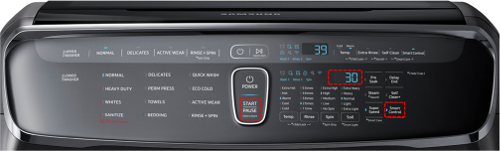
NOTE
For the FlexWash washer, the lower washer must be used. However, HRM will still access information for both washers.
HRM can be used to:
- Perform a software update (if one is available).
- Troubleshoot the issues in the following sections.
HRM Functions on the Washer
- Do NOT start a wash cycle. If a wash cycle is started through HRM, the wash cycle will stop as soon as another tab is selected in HRM or when the remote session ends. This will leave the washer filled with water.
- Monitoring & Diagnosis cannot be used on a washer. Since the washer cannot be running during HRM, all values will read as OFF.
AGENT ONLY-
Abnormal Display Issues
- If the washer's display is not operating correctly but can still be used, use HRM to connect to the washer, and check the error code history in the Search Error tab. If any current or past error code exists, service is required.
Washer Does Not Start
- If the washer does not start, use HRM to connect to the washer and run a deep analysis, selecting the symptom closest to what the customer is experiencing. After deep analysis finishes, review the results with the customer.
Steam Wash Does Not Work
- If the steam wash setting does not seem to work, use HRM to connect to the washer, and run a deep analysis on the unit, selecting the symptom closest to what the customer is experiencing. After deep analysis finishes, review the results with the customer.
Does Not Spin
- If the washer does not spin, use HRM to connect to the washer, and run a deep analysis on the unit, selecting the symptom closest to what the customer is experiencing. After deep analysis finishes, review the results with the customer.
|

