|
ERROR CODES COVERED (in alphabetical order)
- General Information
- 4E / 4C
- 5E / 5C
- LE / LC/ LC1
- Nd
- nF / nF1
- dc / UE / Ub
- SUdS / Sd
General Information About Errors Codes
- Error codes are used as a starting point for a technician to perform an accurate diagnosis. For example, if the washer has an HE error code, it does not necessarily mean that the heater has failed. The technician will check the washer and its different components to determine the exact cause of the fault.
- To check if the error code may have been a glitch, unplug the washer for 30 seconds, and then plug it back in. If the error code returns, your washer requires service.
Error Code "4E/4C"
You should clean the water hose mesh filter at least one time per year, or if you see"4E" error message on the display. To clean the water hose mesh filter, follow these steps:
- Turn off the water source to the washing machine.
- Unscrew the hose from the back of the washing machine.
- With a pair of pliers, gently pull out the mesh filter from the end of the hose, and then rinse it under water until it's clean. Also clean the inside and outside of the threaded connector.
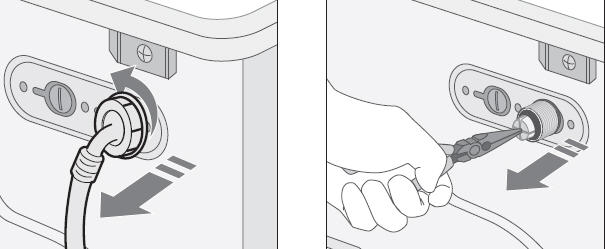
- Push the filter back into place.
- Screw the hose back onto the washing machine.
- Turn on the faucet and then make sure the connections are watertight.
Error Code "5E/5C"
Clean the debris filter 5 or 6 times a year, or if you see the "5E" error message on the display. To clean the debris filter, follow these steps:
- Open the filter cover.
- Unscrew the emergency drain cap by turning it to the left, and drain all the water.
- Unscrew the filter cap, and take it out.
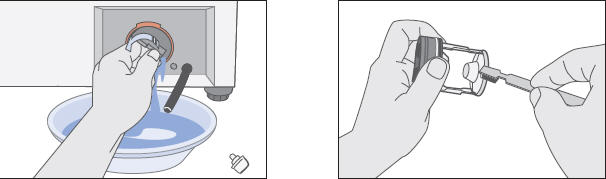
- Wash any dirt or other material from the filter.
- Make sure the drain pump propeller behind the filter is not blocked.
- Replace the filter cap.
- Replace the filter cover.
Error Code "LE/LC"
If the washer is displaying "LE" on the display panel, there is probably a problem with the Water Level Sensor or your washer has a leak.
- If there are no visible leaks, empty the washer, and then fill the empty washer with water. Do not add detergent. If you see suds in the water, then you are probably using NON-HE detergent, or too much HE detergent. This, and not the Water Level Sensor, is causing the washer to display a false code.
- To resolve the problem, Samsung recommends using the correct amount of HE detergent as per the detergent manufactures instructions on the detergent bottle.
- If you are using HE detergent and see suds, then you may be using too much detergent, and this is causing the washer to display a false code. To resolve the problem, use the recommended amount of detergent as per the detergent manufacturer's recommendations.
- If you do not see suds, then there is a problem with the Water Level Sensor, or there is a water leak. Your washer will require service.
Error Code "Nd"
If your washer is beeping, and the display is flashing "Nd", your debris filter may be clogged.
Caution: If you were running a Hot Cycle or Sanitize cycle when the Nd error flashed, the water in the washer may be very hot. Allow the water to cool, for approximately 1 hour, before performing this procedure.
To check for a clogged debris filter, follow these steps:
- Open the debris filter cover.
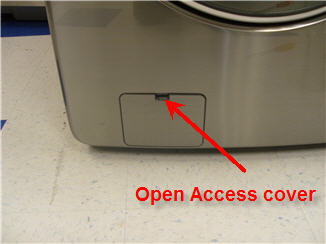
- Remove the cover by pulling the cover outwards.
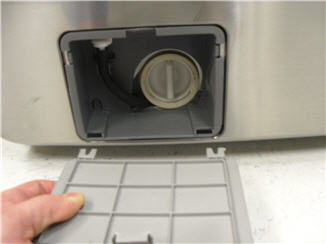
- Remove the black rubber drain hose from its holder.
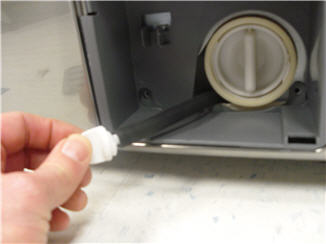
- Place a towel on the floor to prevent water damage to the floor.
- Remove the white drain plug from the drain hose, and then drain the water in a suitable container.
- Remove the debris filter by turning it counter clockwise.
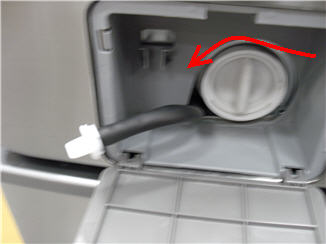
- Clean the filter, and then reinstall the filter.
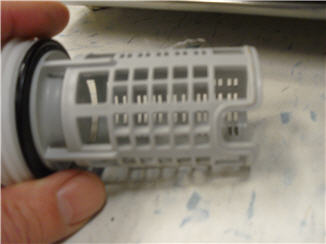
- Reinstall the drain tube cap, and secure it in its holder.
- Reinstall the access door.
- Check for leaks as the washer is filling up.
Note: Some older washing machine models do not have a debris filter. If this is the case, please perform the following steps instead:
- Turn off the unit and turn it on again.
- Select the Spin only cycle.
- Press Start/Pause to start draining the water.
- If it still does not drain, service is required.
Error Code "nF/nF1"
The nF error code stands for "No Fill."
If you have just installed your washer and it will not fill, or the display shows nF, check the following:
- Make sure the door to the unit is tightly closed.
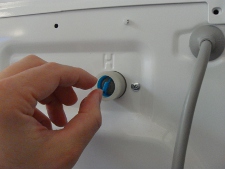
- Make sure that both the hot and cold water lines are connected (cold to the cold and hot to the hot). The picture below shows the cold (C) and hot (H) water inlets for the water hoses:
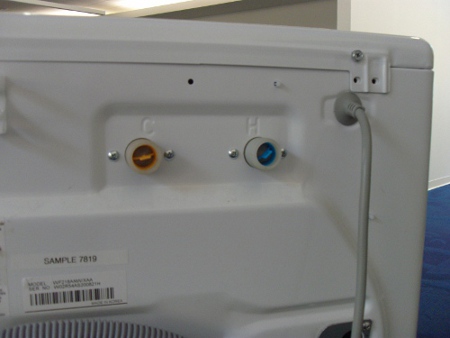
Important: If you do not have a hot water source, you can hook up the cold water source to the cold input on the back of the washer and another cold water source to the hot input on the back of the washer (but NEVER a hot water source to the cold water input on the back of the washer).
- Make sure the water supply valves are fully opened. Since these valves are rarely opened or closed, they may be difficult to turn.
- In addition, make sure the water source has sufficient water pressure. Samsung washers require between 20 to 116 psi (pounds per square inch).
- You must use the factory supplied water lines that came with your washer. Certain water lines with automatic shutoff's do work properly, such as the Floodsafe Flexible Braided Steel Supply Lines.
- Make sure that the water lines are straight and not bent or kinked.
- Check the hose filter screens to ensure they that are not blocked or partially clogged with debris. These are removable and can be easily cleaned if clogged. Simply run them under a faucet and clear the debris from the mesh screen with a finger or small brush. They are located in the inlet port on the back of the washer (where the water lines connect to the unit).
- After checking all of the above, close the door, then press the Start/Pause button to start the fill process.
Error code "dc/UE/UC/Ub"
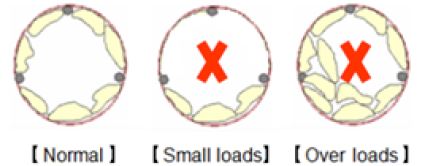
Wahser vibrates too much and displays dc/UE/UC/Ub.
These errors refer to Load balance issues.
- Make sure unit is leveled.
- Make sure the wash load is evenly distributed.
- Make sure customer is not overloading the machine or not loading enough
(small loads)
Error code "SUdS / Sd"
SUdS / Sd--Suds is detected during the wash/rinse operation.
- Make sure customer is using the correct amount of detergent (See detergemnt's
lablr for recommeded amout)
- Make sure customer uses HE detergent.
- For concentrated detergent, e.g 1x, 1x and 3x. Advise customer to reduce
the amount of detergent accordingly.
- Using fabric softner reduces Suds.
If none of these troubleshooting steps resolve the issue, the washer requires service.
|


