|
No title
Question
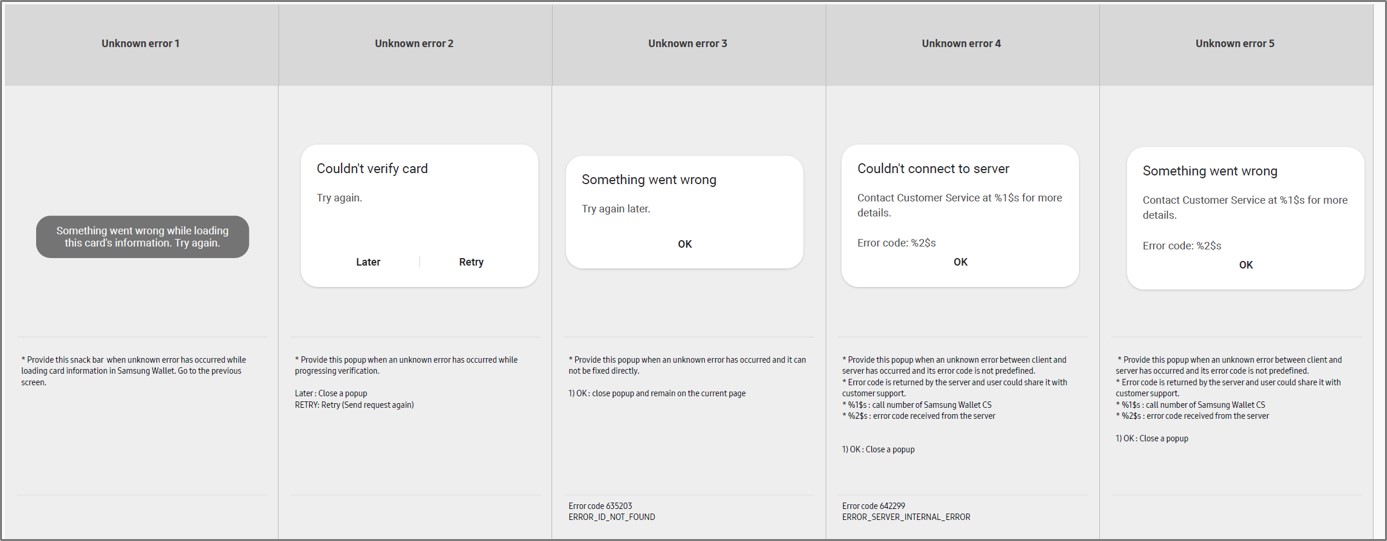
It occurs error code 642299 while using Samsung
Wallet app / It occurs some errors when using or registering a card.
Answer
It is related to server issue. Please check
and try some workaround with the following measures to resolve the phenomenon.
Case 1) Temporarily
unavailable - Restart your phone and try again
- It may occur because of network problem,
Samsung Wallet app or related services errors, installation of external
files that may have permission for the device or rooting files. So, exact
cause may vary depending on the sources. Please update the latest version
of Samsung Wallet app, check if the Internet browser is normally accessible
through mobile data network(LTE, 3G, etc.) after disconnecting Wi-Fi.
Case 2) Unknown
error / specific action not available
- For the Samsung Wallet app global version,
unidentified error or specific action not available problem should be investigated
further with dumpstate logs. Please provide logs after reproducing.
[How to get dumpstate log]
- Samsung Keypad in Phone app > enter
*#9900# > entering SysDump menu > tab 'Run dumpstate &
Copy to sdcard' > you can find the log files in 'log' folder on
My Files app(Internal storage > 'log' folder)
Case 3) Network
error
- First, please check if the network connection
is available properly by trying to connect through Internet browser. If
the network connection has no problem, then the problem should be investigated
further with dumpstate logs. Please provide logs after reproducing.
Case 4) Card
Registration not possible
 If card registration is not possible because of "unsupported card"
or support Banking related issues, please check the following details.
If card registration is not possible because of "unsupported card"
or support Banking related issues, please check the following details.
- Please feedback relevant information such
as Issuer Name, Card BIN.
* There may be some cases that does not
work registration coming from Banking institution's policy or operation issues
(For example, CoA card not available, BIN should be registered beforehand, but
BIN not registered in Digital Wallet)
 If card registration is not possible during initial registration or after deletion
of the card because of "previously registered card," check the following
details.
If card registration is not possible during initial registration or after deletion
of the card because of "previously registered card," check the following
details.
- Please feedback relevant information such
as Samsung account ID, issuer country/name, Card BIN
* For VISA card, card registration is
not available for 7 days when trying registration after removing card in same
device.
- In this case, user should contact Card
company to be removed the card information registered on the Samsung Wallet
app
 Network connection is good but occurs "server connection error" when
registration, please check the following details:
Network connection is good but occurs "server connection error" when
registration, please check the following details:
- Card registration may be temporarily unavailable
because of system error by Samsung/Card network/Issuer
* Try manual
or automatic re-registration because registration may not recognize temporarily.
- If the issue still exists
* Please feedback
relevant information such as Samsung account ID, issuer country/name, Card BIN
(including fore 6 characters)
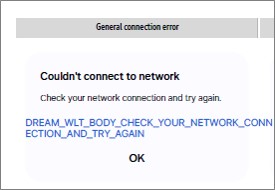
[Unknown error messages by situation]
[Unknown error messages by situation]
|

